

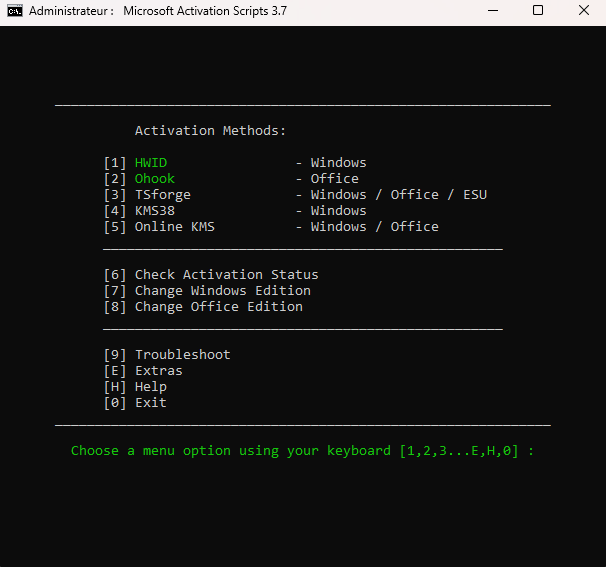
Activateur Windows et Office comprenant les méthodes d'activation HWID, Ohook, TSforge, KMS38 et Online KMS, ainsi qu'un dépannage avancé.
Téléchargez le script : MAS_AIO.cmd
Exécutez le fichier nommé
MAS_AIO.cmd.Les options d'activation s'afficheront. Suivez les instructions à l'écran.
C'est tout.
Caractéristiques
Méthode HWID (licence numérique) pour activer Windows de manière permanente
Méthode Ohook pour activer définitivement Office
Méthode TSforge pour activer définitivement Windows/ESU/Office
Méthode KMS38 pour activer Windows jusqu'en 2038
Méthode KMS en ligne pour activer Windows/Office pendant 180 jours (à vie avec renouvellement)
Dépannage d'activation avancé
Dossiers $OEM$ pour la préactivation
Changer l'édition de Windows
Changer l'édition Office
Vérifier l'état d'activation de Windows/Office
Disponible en versions Tout en un et Fichiers séparés
Entièrement open source et basé sur des scripts batch
Moins de détections d'antivirus
Type d'activation | Produit pris en charge | Période d'activation | Internet est-il nécessaire ? |
|---|---|---|---|
HWID | Windows 10-11 | Permanent | Oui |
Ohook | Bureau | Permanent | Non |
TSforge | Windows / ESU / Bureau | Permanent | Oui, nécessaire sur la version 26100 et ultérieure |
KMS38 | Windows 10-11-Serveur | Jusqu'en 2038 | Non |
KMS en ligne | Windows / Office | 180 jours. À vie avec renouvellement. | Oui |